
Why your NetFlow collector shows no flows
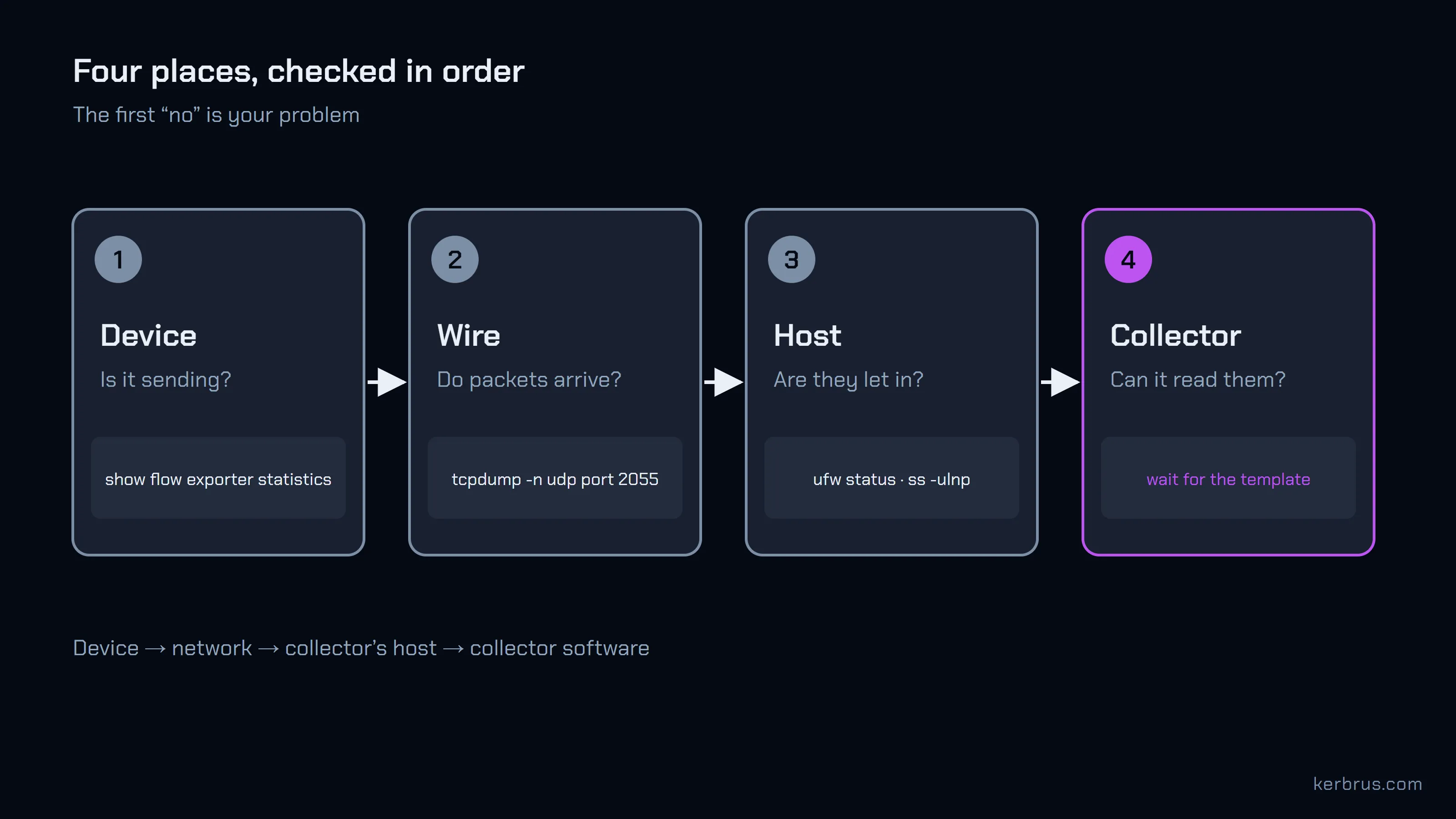
A NetFlow collector that shows nothing is broken in one of four places, and you can find which one in about ten minutes.
The device is not exporting, the packets never reach the collector’s host, the host turns them away, or the collector cannot read them yet. Each place has one command that answers yes or no. Run them in that order, and the first “no” is your problem.
The fourth one catches the most people, because it is usually not a fault at all. NetFlow v9 and IPFIX send their data in code, and they post the codebook separately, sometimes only every ten minutes.
Let’s walk the path.
Start at the device: is it sending at all?
Every exporter keeps a count of what it has sent. If that count is not climbing, nothing downstream matters yet.
On a Cisco switch or router running Flexible NetFlow:
Switch# show flow exporter statistics
Flow Exporter Replicator:
  Packet send statistics (last cleared 13w6d ago):
    Successfully sent:         22601964              (28274015288 bytes)

  Client send statistics:
    Client: Flow Monitor FlowMonitor01
      Records added:           197628709
        - sent:                197628709
That is our lab switch after 13 weeks and 6 days. Two things to read. “Successfully sent” should grow each time you run the command. And “Records added” should equal “sent”: this switch made 197,628,709 records and sent every one.
On pfSense, the same question is softflowctl ... statistics; our pfSense NetFlow guide walks through it. Other vendors have an equivalent, usually under “flow exporter” or “netflow” in their status pages.
If the count is flat, the exporter is off, attached to no interface, or pointed nowhere. Fix that first.
Then the wire: do packets reach the collector’s host?
The device says it is sending. The next question is whether anything arrives.
Run a packet capture on the collector’s host, on the port the device sends to:
$ sudo tcpdump -n -i eth0 -c 8 "udp port 2055 and src host 192.0.2.2"
IP 192.0.2.2.50331 > 192.0.2.10.2055: UDP, length 1372
IP 192.0.2.2.50331 > 192.0.2.10.2055: UDP, length 1372
...
8 packets captured
0 packets dropped by kernel
That is a real capture from our lab collector, with the addresses changed. Each line is one export packet: the device’s address and source port, the collector’s address and port, and the size.
You may have been told to test the port with nc -u -z. Don’t trust it. UDP has no handshake, so nc reports success whenever nothing complains, including when nothing is listening. tcpdump shows the packets themselves.
No packets means the problem is on the way: the export destination on the device is wrong, a router has no route, or a firewall between the two drops UDP.
Then the host: packets arrive, but the collector never sees them
This one is maddening, because tcpdump shows the packets and the collector still shows nothing.
tcpdump sees packets as they come off the network card, before the host’s own firewall decides anything. So packets in the capture can still be dropped a moment later. Three usual suspects:
- The host firewall.
sudo ufw statusorsudo firewall-cmd --list-all. The flow port must be open for UDP, not just TCP. - Docker. A collector in a container needs its port published as UDP:
2055:2055/udp. Without/udp, Docker publishes TCP only, and every flow packet dies at the door. - Nothing listening.
sudo ss -ulnp | grep 2055should show the collector’s process on that port.
Also check the port matches. Some collectors listen for each protocol on its own port, so NetFlow v9 sent to an IPFIX-only port is simply ignored. Flow Collector accepts NetFlow v5, v9 and IPFIX on each of its ports (2055, 9995 and 4739), so that mistake does not apply to it.
“No template received” means the codebook hasn’t come yet
Packets arrive. The collector sees them. And it logs “no template received”.
Here is why. A NetFlow v9 or IPFIX data record is a row of numbers with no labels. To read it, the collector needs the template: a separate message that says “the first 4 bytes are the source address, the next 4 the destination, then 2 bytes of port” and so on. Think of the data as letters in code and the template as the codebook. The exporter sends the codebook now and then, not with every letter.
This is the codebook our lab switch sends, trimmed:
Switch# show flow exporter Replicator templates
  Template ID    : 256
  Record Size    : 56
  |                 Field                   |    ID | Ent.ID | Offset |  Size |
  | ipv4 source address                     |     8 |        |      0 |     4 |
  | ipv4 destination address                |    12 |        |      4 |     4 |
  | transport source-port                   |     7 |        |      8 |     2 |
  | transport destination-port              |    11 |        |     10 |     2 |
  ...
How often it comes is a setting. Our switch’s configuration does not mention it, and the default shows up only when you ask for everything:
Switch# show running-config all | section flow exporter
flow exporter Replicator
 ...
 template data timeout 600
600 seconds. So a collector that starts listening just after a template went out can wait ten minutes before it can read anything. Cisco’s reference gives the same default. You can lower it on the exporter:
flow exporter Replicator
 template data timeout 60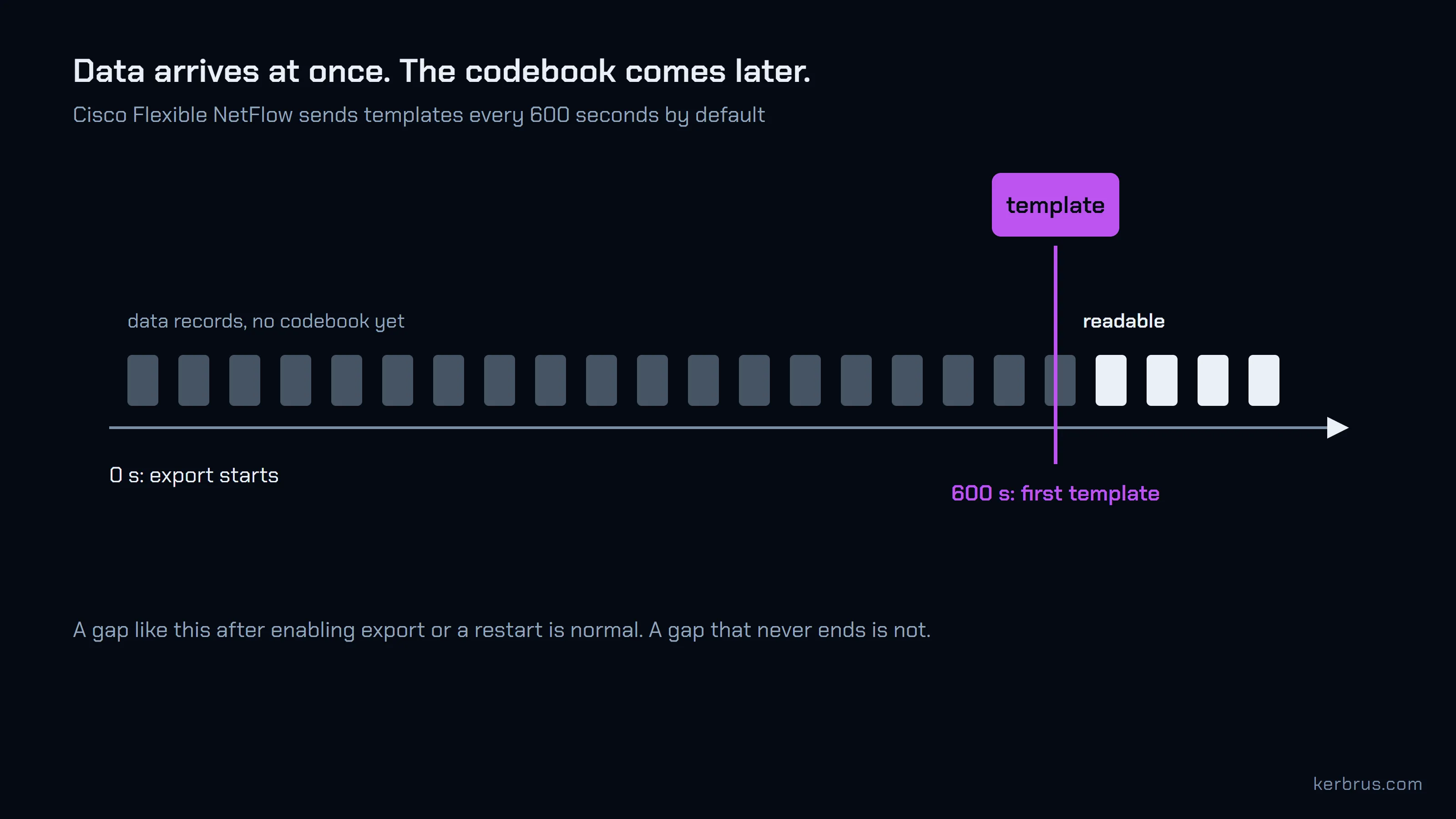
A gap after you enable export, or after the collector restarts, is normal. A gap that never closes is not: it means the templates are not arriving at all, and you should go back to the capture and look for them. NetFlow v5 has no templates, so it never has this problem.
Flows that stop after working: the codebook got lost
Sometimes it all works for a day, and then the flows from one device stop.
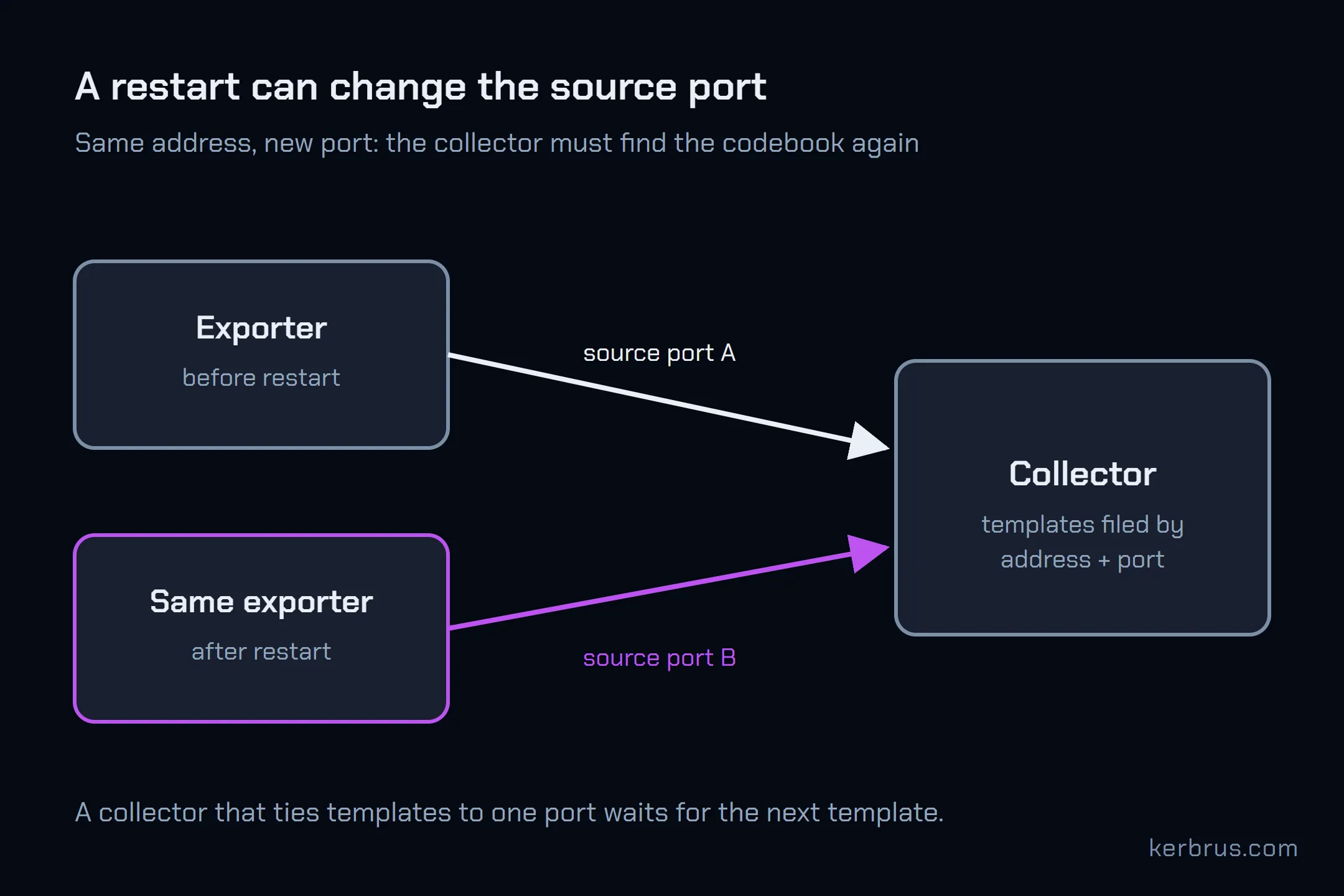
The collector still has a codebook, just the wrong one. A collector remembers each template by the exporter that sent it, and the exporter is more than an IP address. When an exporter restarts it can come back from a new UDP source port, and until its next template arrives the collector cannot read it. softflowd on pfSense does exactly this: our lab firewall used two different source ports in under two hours.
Worse, one address can be two exporters. pfSense runs one softflowd process per interface, each with its own templates, all from the firewall’s single IP. A collector that files them all under one address mixes their codebooks.
What to do: look at the source port in your capture, before and after the flows stopped. If it changed, the exporter restarted, and the next template will fix it. If the problem keeps coming back, lower the template timeout so the gap is short. Flow Collector keeps each exporter’s streams apart by source port and carries templates across a port change, so a softflowd restart does not cost it the codebook.
What these checks cannot tell you
They prove packets leave the device, cross the network, pass the host and decode. They do not prove the device exported every flow in the first place. Sampling, a full flow table and the exporter’s own drops all happen before the first check. For those, read the exporter’s statistics closely; the pfSense guide shows what a full flow table looks like.
Questions
How long should I wait for templates? Up to the exporter’s template timeout. That is 600 seconds by default on Cisco Flexible NetFlow. If you cannot wait, lower it on the exporter.
Does NetFlow have to use port 2055? No. 2055 is a habit, not a standard: IANA has it registered to something called the Iliad-Odyssey Protocol. IPFIX does have its own port, 4739. Any port works as long as the exporter and the collector agree.
Can I test a collector without a router? Yes. A flow generator such as nflow-generator sends synthetic NetFlow at a collector, which separates “the collector is broken” from “the device is broken”.
Why do my flows show up on one port but not another? Some collectors bind each protocol to one port. Check which versions your collector expects on which port.
Flow Collector is free up to 1,000 flows per second. See pricing.
Four places, one command each, and the codebook that was only ever ten minutes away.